





How to Replace Image and Media Files in WordPress?
You want to replace image and Media Files in WordPress, but it feels frustrating, especially when you need to keep the same file URL and avoid broken links. Normally, you would need to delete the old file, upload a new one, and update it manually across your website.
With Ninja Media, you can replace media files easily without changing URLs or affecting your existing content.
Why Replace Image and Media Files in WordPress?
There are many reasons why you may need to replace a media file:
- Update old images
- Replace PDFs or documents
- Fix image mistakes
- Upload optimized files
- Change branding assets
- Update downloadable files without changing links
Replacing files correctly helps keep your website organized and prevents broken media across posts and pages.
The Difficult Way: Manual Replacement
The traditional way usually involves:
- Deleting the old media file
- Uploading a new file
- Replacing the file manually in posts and pages
- Fixing broken links or missing media
This process takes time and can create problems if the original file URL changes.
The Easy Way: Replace Media with Ninja Media
Ninja Media includes a built-in Replace Media feature that makes the process simple and fast.
Steps to Replace Media Files
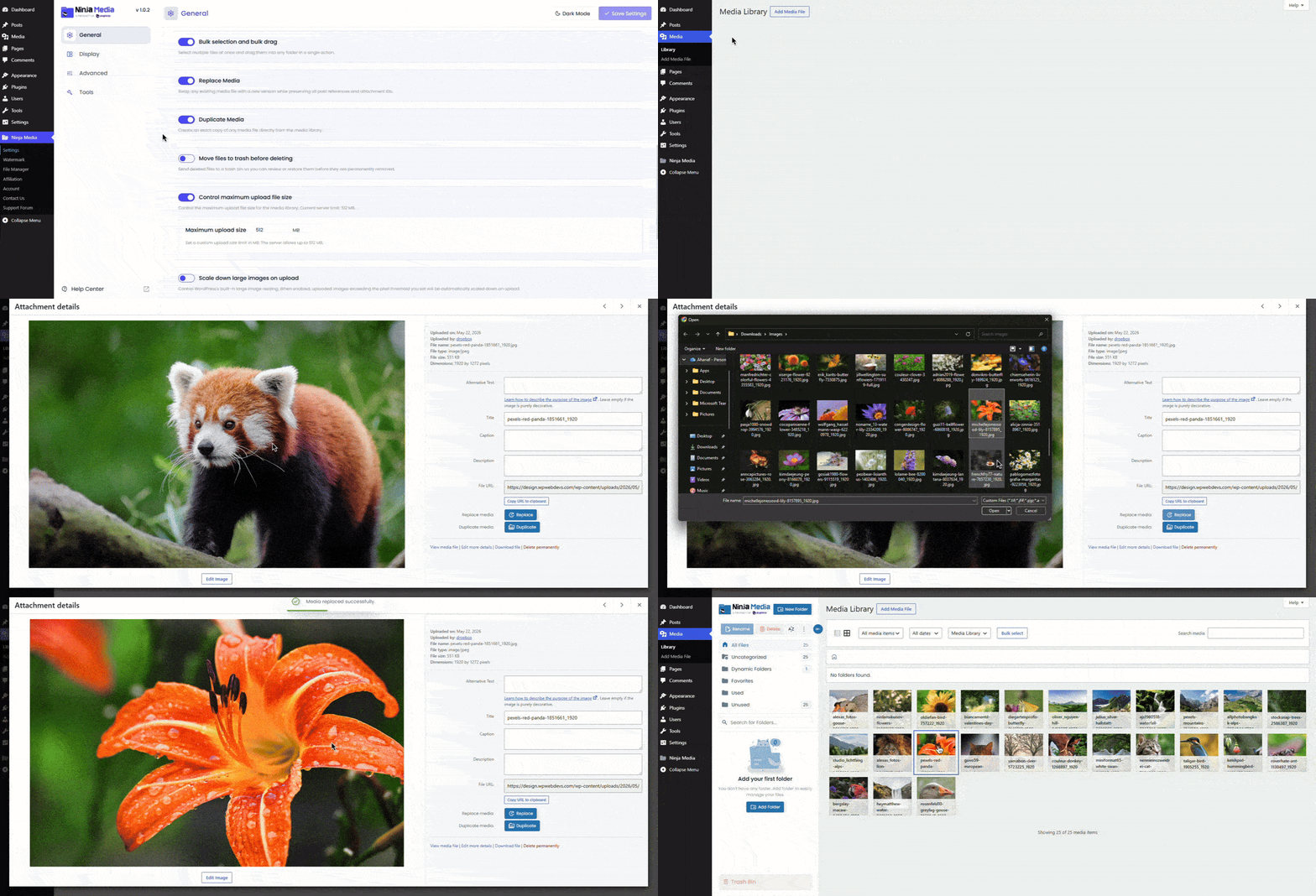
- Install and activate Ninja Media
- Open your WordPress Media Library
- Click on an image that you want to replace
- Click the Replace Media button
- Then choose your file! Done.
That’s it. Ninja Media will replace the old file while keeping the same media URL and existing placements across your website.
Benefits of Using Ninja Media
- Replace files without breaking links
- Keep the same media URL
- Save time managing media
- Update images and documents instantly
- Improve media management workflow
- No coding required
Final Thoughts
Replacing media files in WordPress does not have to be difficult. With Ninja Media, you can update images, documents, and other files quickly without affecting your content or media links.
It is a faster, cleaner, and more reliable way to manage WordPress media files.

 Join Community