




How to Start a Free Trial of Ninja Media PRO
Want to explore the premium features of Ninja Media before purchasing? You can start a free trial of the PRO version and experience advanced media management features directly on your WordPress website.
Step 1: Go to the Trial Page
Visit the Ninja Media PRO trial page to start your free trial: https://checkout.freemius.com/plugin/28374/plan/47245/?trial=paid
Step 2: Enter Your Information
Choose your preferred license type and enter your details, including:
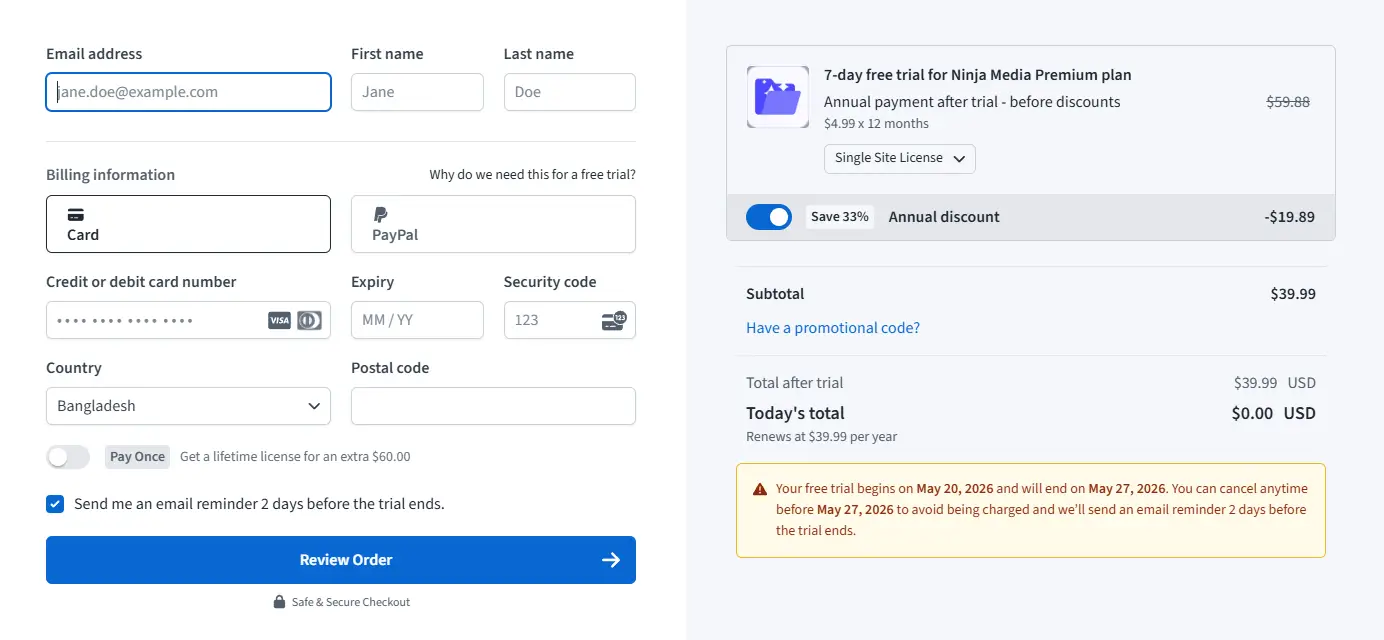
- Email address
- First name and last name
- Phone number
- Payment method (Credit Card or PayPal)
- Billing information and country
After completing the information:
- Click Review Order
- Click Start Trial & Subscribe
You will receive a free trial period for Ninja Media PRO.
Step 3: Check Your Email
After starting the trial:
- Check your email inbox
- You will receive the Ninja Media PRO plugin download link
- Your License Key and account details will also be included
Download the plugin ZIP file and keep your license key ready for activation.
Step 4: Install Ninja Media PRO
To install the plugin on your WordPress website:
- Go to Plugins → Add New Plugin
- Click Upload Plugin
- Select the Ninja Media PRO ZIP file
- Click Install Now
- Activate the plugin
- Then click on the Active License button with the plugin in the plugin list.
- And activate the license.

 Join Community