







Increase Maximum Upload File Size in WordPress
Sometimes WordPress limits the maximum upload file size, which can prevent you from uploading large images, videos, PDFs, or other media files. In this guide, you will learn two ways to increase the upload file size limit in WordPress.
Method 1: Increase Upload Size Using Code
This method requires editing your server or WordPress configuration files manually, which can be confusing for beginners.
You can increase the upload limit by editing files like:
php.ini.htaccesswp-config.php
Example configuration:
upload_max_filesize = 256M
post_max_size = 256M
max_execution_time = 300
max_input_time = 300
Or using .htaccess:
php_value upload_max_filesize 256M
php_value post_max_size 256M
php_value max_execution_time 300
php_value max_input_time 300
After saving the changes, you may need to restart your server or contact your hosting provider if the changes do not apply correctly.
This method can be difficult for non-technical users and may cause issues if configured incorrectly.
Method 2: Increase Upload Size Using Ninja Media
Ninja Media provides a much easier way to control the maximum upload file size directly from your WordPress dashboard without editing any code.
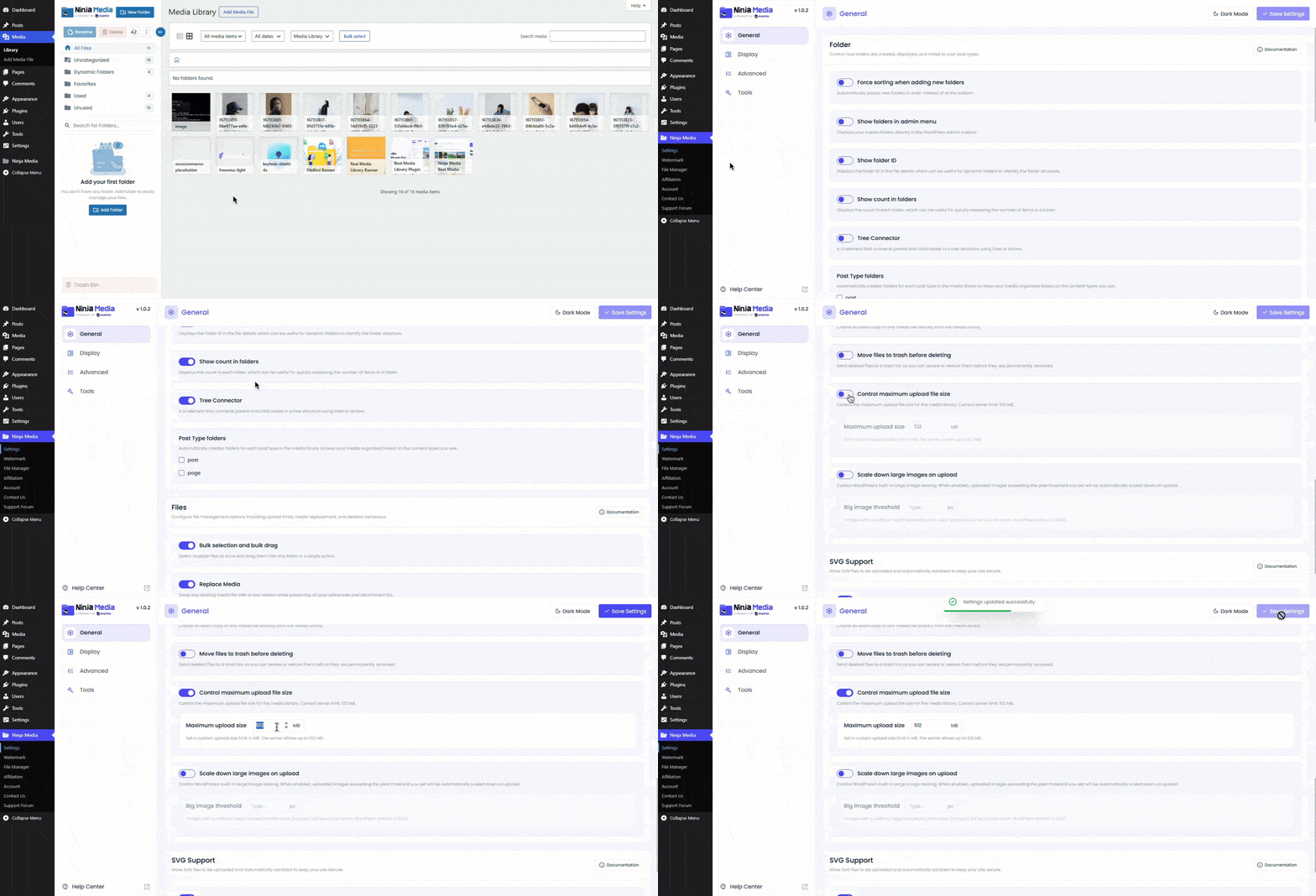
Steps to Increase Upload File Size
- Install and activate the Ninja Media plugin
- Go to Ninja Media → Settings → General
- Scroll down to Control Maximum Upload File Size
- Enable the toggle option
- Enter your preferred upload size in the input box
- Click Save Changes
That’s it. Your new upload file size limit will now be applied to your WordPress website.
Why Use Ninja Media?
Instead of editing confusing server files, Ninja Media gives you a simple and user-friendly way to manage upload limits directly inside WordPress.
It saves time, reduces technical issues, and makes media management easier for beginners and professionals alike.

 Join Community