




When you prepare to submit plugin to wordpress.org for the first time, understanding the community review standards is vital for achieving rapid approval in 2026. The official WordPress plugin directory powers millions of websites worldwide and maintains rigorous security guidelines to protect users from vulnerabilities. If you want to submit plugin to wordpress.org without experiencing lengthy review delays or outright rejections, following a structured release process is essential.
Table of Contents
Pre-Flight Checklist to Submit Plugin to WordPress.org
Before you upload your initial archive, ensure your codebase complies with all directory standards. Reviewers manually audit every submission against strict code security and licensing criteria.
According to the WordPress.org Detailed Plugin Guidelines, common reasons submissions get flagged include unescaped output variables, missing security nonces on administrative actions, and trademark violations in the plugin slug. Every line of PHP and JavaScript must adhere to standard security best practices.
Essential Security Checks Before Submission
The plugin review team prioritizes user security above all else. Before submitting your project, verify that your code adheres to these non-negotiable security requirements:
Sanitization and Escaping: Always sanitize incoming request data using functions like sanitize_text_field, sanitize_key, and absint. When rendering dynamic values in HTML templates, escape outputs using esc_html, esc_attr, or esc_url to block cross-site scripting attacks.
Nonce Verification: Every administrative action, settings update, or AJAX request must verify WordPress security nonces using check_admin_referer or wp_verify_nonce to guard against CSRF vulnerabilities.
Direct File Access Prevention: Insert defined(‘ABSPATH’) || exit; at the beginning of every PHP script in your plugin package to stop unauthorized direct file execution.
Capability Verification: Verify that current users possess required privileges before modifying site configuration, utilizing current_user_can(‘manage_options’) checks consistently.
Understanding Review Timelines and Volunteer Workflows
The WordPress repository review team consists of dedicated community volunteers who review hundreds of pending submissions every week. After submitting your code, patience is crucial. Current review queues typically take between two to four weeks depending on submission volume.
During this evaluation window, avoid submitting duplicate applications or emailing team members privately. Instead, keep a close watch on the email address associated with your WordPress.org developer account. Reviewers send detailed technical audit notes containing specific file paths and line numbers that require modifications.
Step-by-Step: How to Submit Plugin to WordPress.org Successfully
Navigating the repository approval process is straightforward when you follow this proven seven-stage workflow to submit plugin to wordpress.org:
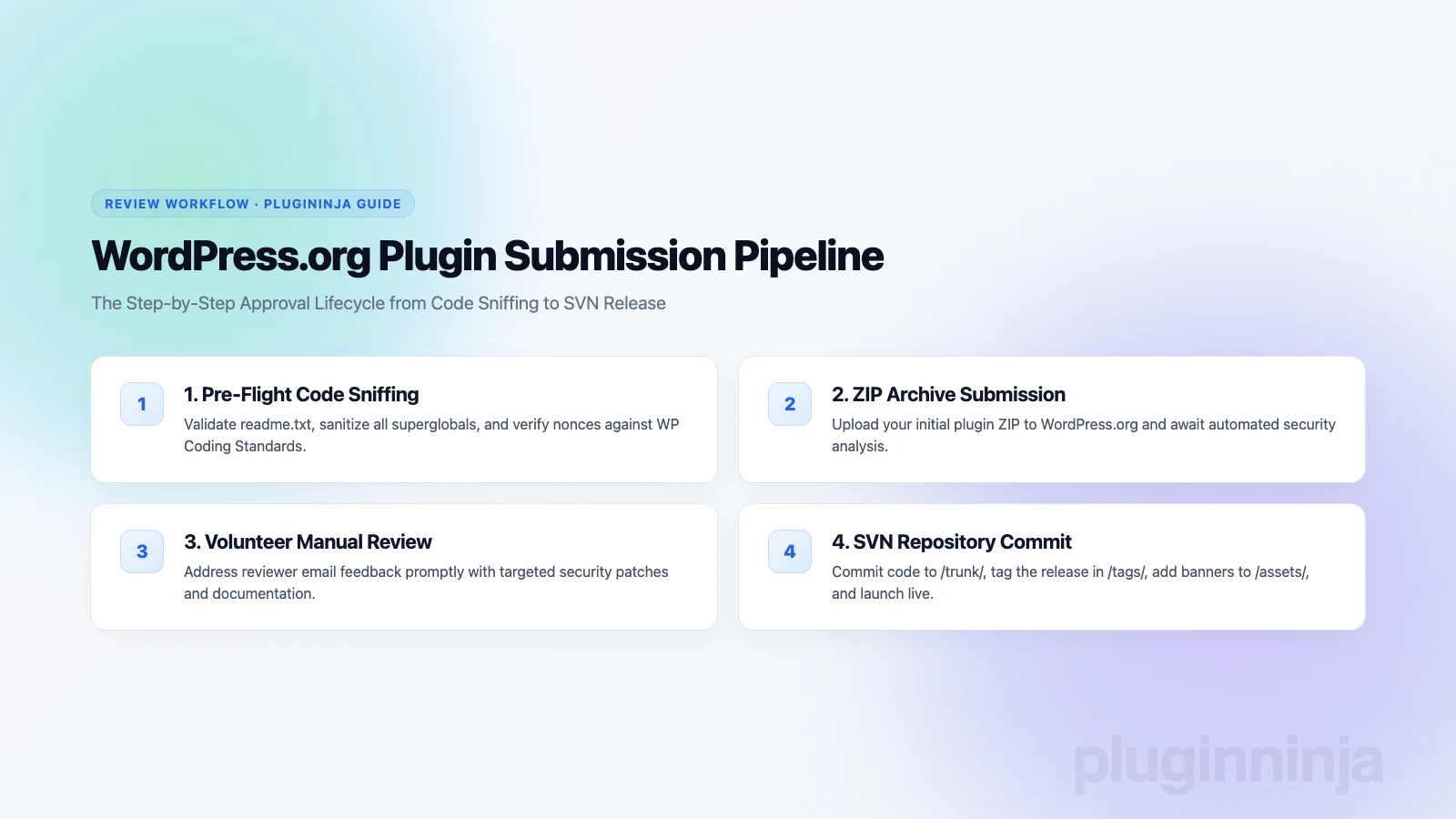
Step 1: Automated Quality Audits: Run your plugin through the official Plugin Check (PCP) utility. This tool scans your codebase for deprecated core hooks, missing sanitization functions, and improper internationalization text domains.
Step 2: Readme.txt Validation: Build a compliant readme file containing plugin headers, licensing, short descriptions, and installation guides. Test your formatting with the WordPress readme validator to ensure accurate rendering.
Step 3: Initial ZIP Archive Creation: Compile your production assets, removing local development artifacts such as .git folders, node_modules, and unit test suites. Create a clean ZIP file named after your plugin slug.
Step 4: Upload to the Repository: Log in with your WordPress.org credentials, navigate to the Add Your Plugin screen, and upload your clean ZIP archive for queue processing.
Step 5: Reviewer Collaboration: A volunteer reviewer will inspect your source code. When they identify security issues, address each item patiently, test your fixes thoroughly, and upload corrected zip revisions promptly.
Step 6: SVN Repository Setup: Upon approval, you receive access to your official Subversion repository. Check out your trunk, branches, and tags directories locally to manage deployments.
Step 7: Publishing Assets and Tags: Commit your production code into the trunk directory, tag your stable version inside the tags folder, and commit 256×256 icons and 772×250 banners into the assets directory.
Managing SVN and Releases for Maximum Visibility
Once your plugin is live on the directory, maintaining consistent releases and clear changelogs establishes user trust. Commit new releases by creating numbered tag folders in Subversion and updating the Stable Tag header in your readme file.
Our plugins at PluginInja, including Ninja Drive for Google Drive integration and Ninja Media for folder organization, follow this exact repository release cycle. Check out our development tutorials on the PluginInja blog to learn more about professional plugin engineering.
Growing User Adoption After Approval
When you submit plugin to wordpress.org and pass review, active user support builds your plugin reputation. Monitor support forums regularly, resolve reported bug tickets promptly, and release maintenance updates whenever major WordPress core versions launch.
Engaging constructively with user feedback ensures your project thrives long after you submit plugin to wordpress.org. Positive community reviews boost directory search placement, driving steady organic installations.
Common Mistakes When Submitting to the Plugin Directory
Many first-time developers face delays because of simple administrative oversights. Avoiding these frequent stumbling blocks will help your review move quickly:
Trademark Violations in Slugs: Never begin your plugin slug with protected brand names like WordPress or WooCommerce. Use descriptive prefixes like myplugin-for-wordpress instead of wordpress-myplugin.
Bundling External Services Without Disclosure: If your plugin communicates with an external cloud service or third-party API, you must disclose terms of service and privacy policies in your readme file.
Obfuscated Code or Remote Scripts: The repository strictly prohibits loading executable JavaScript or PHP from external servers. All code must be bundled locally and human-readable.
Final Thoughts on How to Submit Plugin to WordPress.org
Successfully navigating the process to submit plugin to wordpress.org opens your software to a global audience of millions of site owners. By conducting thorough code audits, adhering to security guidelines, and cooperating with volunteer reviewers, you can secure repository approval smoothly. Prepare your code carefully and submit plugin to wordpress.org with confidence to share your innovation with the WordPress community.
Frequently Asked Questions
The initial review typically takes between one and seven business days, depending on queue volume. Once a reviewer is assigned, they will email you feedback with specific requirements or code fixes. Promptly addressing each requested adjustment and replying directly to their email helps expedite the final approval and SVN access grant.
Yes, plugins that integrate with third-party software as a service platforms or APIs are permitted on the repository. However, the plugin must explicitly declare any external services in the readme file, provide clear terms of service links, and never send user or site data externally without transparent administrative consent.
A rejection email provides detailed line-by-line feedback explaining the violations, such as unescaped output, missing nonces, or guideline infractions. You can make the requested code corrections and reply to the review email with your updated ZIP attachment. Fix only what was flagged to avoid introducing new issues into the review queue.
Plugin slugs cannot be modified once approved and created in the WordPress.org Subversion repository. Your chosen slug defines your permanent plugin URL, SVN path, and update identifier. If you need a different slug, you must submit an entirely new plugin under the new name and abandon the old submission.
WordPress.org requires all plugin releases and asset banners to be committed through their Subversion repository. However, you do not need to manage SVN manually on your local machine. Most modern developers maintain their primary code in GitHub and use automated GitHub Actions to deploy release tags directly into SVN.
Yes, all plugins hosted on WordPress.org must be licensed under the GNU General Public License version 2 or later, or a compatible license. This requirement covers all included PHP files, JavaScript libraries, stylesheets, and bundled media assets, ensuring full compatibility with WordPress core licensing and open-source principles.


 Jakir


 Join Community